Welcome to the tech blog copacopi

Showing posts with label android root. Show all posts

ROOT your Sony Ericsson Xperia Series Easily


Hello Users,

Here is an easy and simple way to Root your Xperia. XDA Dev’s have created a tool called a FlashTool. This tool right now supports X8, X10, X10 Mini, X10 Mini Pro, Arc, Play, Neo. Rooting is not it’s main purpose. It can be used for installing APK, xRecovery, Flashing, cleaning ROM and many other things.  Still in development, but Rooting through this is very safe and effective. It takes only one click.
So, let’s see how it is done.
REQUIREMENTS:
1. First you will need FlashTool. Download FlashTool from here
Flash tool error fix version. Current version 0.2.9.1 (will be updated as released)
2. JAVA latest. Get it Here. (chose according to your Operating System)
3. Xperia X10 Series phone. (Lol! You have it or you have no purpose to be here)
4. Fixed X10Flashtool.EXE File – Get from same page as above (needed in case if FlashTool gives error about Java JVM Heap Size)
5. Pause/Stop your Antivirus (recent update)
5. Human or equal :-P
UPDATE:
If you have upgraded your Xperia X10a and X10i to new Android 2.3.3 Gingerbread then they won’t be rooted by this method and tools.
INSTALLATIONS:
After downloading FlashTool RAR file, extract it to local folder on your computer. There is a setup file inside it. Run it and give it a location where you want to install the FlashTool. It’s in French so use your mind. Browse button can be identified easily. Then after selecting location just hit Enter. Oui? Lol!
Try to Run file ‘X10FlashTool.exe’ inside the FlashTool folder you just installed. If it returns you with JVM could not be started and xmx Heap size thing. Download the failsafe file given. It’s small. It contains fixed X10FlashTool.exe for people who are having issues. Replace that Old file with this new one, means overwrite.
JAVA. Install it. Not a big deal.
STEPS:
1. On your X10 phone go to Settings >> Application >> Developer >> USB Debugging (Click it. It should be On)
2. If its first time you are connecting your phone to PC then Run driver installation from DRIVERS folder under FlashTool folder. Or you can just install PC Companion or SEUS to get drivers automatically installed.
3. Connect the phone.
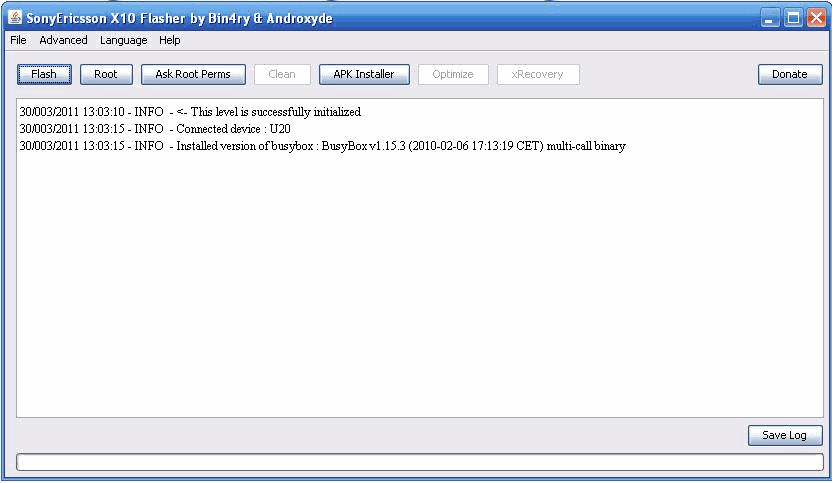
4. Start the FlashTool by clicking X10FlashTool.exe. It will identify the phone. Your screen may look different as my phone is already rooted.
5. Hit Root. Wait for it. It will perform 2 steps and your phone will be restarted. After restart you will SuperUser icon in menu.
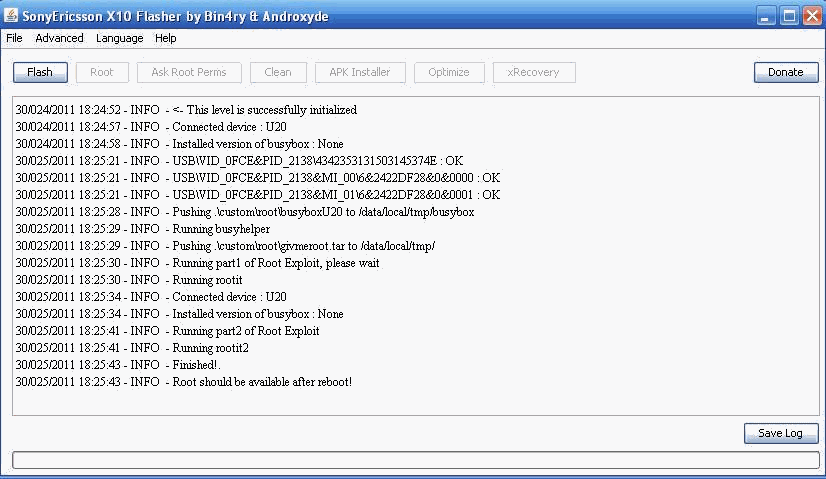
You are done! You got your X10 Series phone rooted.
If it by some reason this method doesn’t work for you or you want to explore more. You can read another method in another post. Links are in beginning of this article.
Read More

New: Android Market Downloader with Handler UI

Here a new Handler UI mod app for Android users. This apps is downloader of Android Market which will handle the download from Market to pass through HandlerUI. This make no data charges for downloading apps there.

Though you need to remember that may be the browsing the Market is not through HandlerUI coz its under test yet. According to our coder, I don't know if this apps will work or not (Failed to use CGI trick). Ok, lets get into it.

Android Market Handler
Minimum Requirements to Use This:
1. You need to ROOT your OS (this is required because the one that i mod is a System Apps).
You can root your android phone by visiting below:
How to root android devices,use handler opera mini 
2. Android Version at least 2.1 (froyo), recommended gingerbread (I'm using it).
3.Latest Android Market App
4. HandlerUI100.apk .This is the UserInterface to change the HandlerUI configurations. You can install it without ROOT.
5. DownloadProvider.apk & DownloadProviderUI.apk .The apps that handles the downloads of apps from the Market.
6. A file browser that can access root folder. Recommended Root Explorer.

How to Use it:
1. Download and put it on your Device: HandlerUI100.apk, DownloadProvider.apk & DownloadProviderUI.apk
2. Run Root Explorer, then go to /system/app , Backup/Copy your original DownloadProvider.apk & DownloadProviderUI.apk from that directory to other else so if you failed on this, you can still recover it.
3. Copy the DownloadProvider.apk & DownloadProviderUI.apk that i provide it to you to /system/app using Root Explorer (make sure you already press "Mount R/W" button before you press paste in /system/app).
4. Install HandlerUI100.apk and run it, don't forget to press Enable HUI to make it work.
5. Open Market and try to download any apps.
Also download :UC Browser Handler for Android [ UC Browser 8.2.3 Handler ...
Notes: Don't Uninstall HandlerUI without restore-ing the original DownloadProvider & DownloadProviderUI.apk
Do all this at your own risk, i dont responsible of any damage that it will cause.
Please respon me if it work or not.

Download Links New Android Market Downloader with Handler UI:
Handlerui100.apk (51 KB)
Downloadprovider.apk (100 KB)
Downloadproviderui.apk (86 KB)
 You may also want to download Top 15 Free Android Apps You Must Have ~ Crackohack
Read More

[APP][1.6+] Ubuntu Installer – Testers wanted

I have working on a project in the form of an app, which guides you through the installation of Ubuntu within android via chroot. It includes a ubuntu 10.10 image I have been working on which includes lots of program to allow users to develop program/scripts etc within Ubuntu on there phone/tablet.
However I have I have yet to get much testing on this device and would like more feedback from users!
Please post your device/kernel/rom along with what did and didn’t work, so I can draw up what I need to change in the next release of the app/ubuntu build.
Website
http://zpwebsites.com/android-app/ub…guide/devices/
Video
http://www.youtube.com/watch?v=UCqzs8yQTM8
App Download

Boot Script
ubuntu.sh(V5) Full Image
This image is 1.5GB to download, once extracted 3.5GB, and include alot of programs like openoffice, thunderbird, firefox and over programs for ‘developing’ – Also allows you to switch between the LXDE and Gnome desktops, and you can define screen size on boot!
ubuntuV5-image.zip
Lightweight Image – This is yet to be included in an app, will be included in the next release (aka 2.0  ), so get it now before anyone else!
This image is just under 500MB to download, once extracted 2.5GB, and include only programs needed (LXDE desktop, web browser, + other basic programs) also allows you to define screen size on boot
ubuntuV5-sm-image.zip
I also want to build up a small group of testers who I can email with new images and scripts, these will include all future distros that I do. If you are interested in joining this test group please PM me or send a email to zac@zpwebsites.com
The only requirement is that your willing to test and send feedback along with screen shoots etc where required, it would also be good if your willing to try different roms and kernels for your device!
Sig Banner
Show your love of ubuntu on android with my sig banner:

image url is “http://dl.dropbox.com/u/11206993/ubuntuuser.png”
Other Guides
Like this guide? want to try something different? then check out my other guides for different distro’s
Backtrack – This is a distro that is based around security testing, it also includes the Gnome desktop environment and a range of other programs.
Updates
29/01/12
*New V5 small image, featuring fixed Java, even more lightweight (now around 1.2GB free) and user can set screen size on boot
*PAID New Build guide which shows you how to build your own Ubuntu images
*Brand new UI To make the whole thing more useable
*PAID new ‘one click boot’ feature to allow quick booting from either the widget or inside the app
*PAID new widget to activate the one click boot
*PAID app install guide changed in light of ‘one click boot’
*Fixed keyboard mapping of random letters in Gnome
18/01/12
*Large ubuntu image now allows user to set screen size on boot!
*Large Ubuntu image now lets you select between LXDE and Gnome desktops
*Large Ubuntu image has been recompiled to fix the likes of Java (note some of the above changes will be included in the small image in the future)
*FAQ section updated with more answers to questions I have been getting
*Install guide updated in light of the new large image
06/01/12
*PAID app file downloads now use new fast FTP server and support direct downloading (click the button to download a image and it starts to download right away)
*New boot script which has fixed problems with it not booting on alot of devices, and fixed problem which some people getting a grey screen when loading UI
*Boot script now downloaded in zip file to fix problems with downloading script
*Both apps fixed to support low resolutions
*Both apps cleaned up
28/12/11
*PAID app now supports 960×540 ‘qHD’ resolution
*ALL Ubuntu lightweight images cleaned up even more saved another 300MB of space
*ALL Ubuntu images updated with all new updates
*ALL Ubuntu images now in .zip format to fix problems with some peoples devices failing to extract the .rar files
*Boot script updated, once booted now terminal acts like a command line interface for Ubuntu, and some boot problems now fixed
*Image and boot script now downloadable separately to allow easier updating
19/12/11
New ‘lighter’ ubuntu image options for all resolutions already supported
15/12/11
New ubuntu images with all updates up to 15/11/11
FREE app ubuntu image resized to fit 800×480 resolution
PAID app ubuntu images now includes 4 images for 800×480, 854×480, 1024×600 and 1280×800 resolutions

Working Devices

Here is a table of working devices:
(if your device is not on the list all it means is no one has reported it working, it may well still work!, the roms and kernels are simply a list one known working, other roms/kernels may well work but these are known to work)
Device Name ROM Kernel Notes
Acer Iconia A500 TegraOwners ICS v96 Thor v3.9r15
Asus Eee Pad Transformer krakd razzle dazzle N/A
Atrix 4G Cyanogenmod faux123′s kernel N/A
Archos 101 Internet Tablet UrukDroid UrukDroid N/A
Dell Streak Mini 5 DSC DSC N/A
Galaxy Player 4.0 Stock 2.3.5 Stock N/A
HTC HD2 MIUI MIUI N/A
HTC Desire Ginger Villain 3.3 Ginger Villain 3.3 N/A
HTC Desire HD Icy-smoke RCMIX3D-V11.1 N/A
HTC Desire S Most Roms Any other than stock N/A
HTC Droid Incredible 2 Sabotage Sense v1.2 drelisdees #21 N/A
HTC EVO 3D Stock Stock N/A
HTC Flyer WiFi 16GB LeeDroid honeycomb LeeDroid honeycomb N/A
HTC Glacier Absolution tdj darkside 12 cm N/A
HTC Inspire 4g Cyanogenmod 7 Cyanogenmod 7 N/A
HTC Sensation XE RCMix3.5 v7.1 2.6.35.13-gc35910f N/A
HTC Thunderbolt Liquid Gingerbread v 3.2 Liquid Gingerbread v 3.2 N/A
Kindle Fire Stock Stock N/A
Samsung Captivate Cyanogenmod 7 Cyanogenmod 7 N/A
Samsung Continuum SCH-I400 EC07-Clean-Froyo 2.2.2 Imnuts Hacked Stock N/A
Samsung Galaxy Note (GT-N7000) Stock 2.3.5 Stock N/A
Samsung Galaxy Nexus AOKP build 21 Franco kernel #15 N/A
Samsung Galaxy Tab P1000 GSM Overcome 4.1.0 Overcome 4.0.0 N/A
Samsung Galaxy Tab 10.1v Android 4.0.3 Android 4.0.3 N/A
Samsung Nexus S Cyanogenmod 7 Cyanogenmod 7 N/A
Samsung Vibrant ICS ICS N/A
Sony Tablet S Stock Stock N/A
Motorola Photon 4G Jokercomplete V1 MoPhoACTV Initiative N/A
Transformer Prime Stock Stock N/A
Xperia Neo NEO SE.TWEAKED Inteks Kernel Clean OC N/A
Read More

Install Ubuntu 10.10 in Android Platform and Run Os inside it

Install Ubuntu 10.10 in Android Platform and Run Os inside it

Hey users , do you want to enjoy the popular desktop Linux OS Ubuntu on your Android powered mobile device, it can’t get easier than this – the free “Ubuntu Installer”
app from Android Market. The application allows users to install and run “Ubuntu” inside Android – The market application installs an customized
Ubuntu 10.10 image optimized for the ARM processor allowing users to run a full Ubuntu system within android. The great thing is users can make calls,
text, and use other android features without having to reboot their phones


Video Link
The application supports quite-a-lot mobile devices and the list can be found from the supported devices link posted at the end of this post, another
requirements are :
Android must be rooted.
1GHZ processor (recommended)
Android 2.1 or higher
Kernel will loop device support (this is included in most custom ROM’s)
SD card with at least 3.5GB of free space for large image (2.5GB for small image)
Data connection on your device
Ext2 file system support
Key features include:
Two types of Ubuntu image ‘large’ and ‘lightweight’ Both have:
Ability to install a full operating system on your phone
LXDE Desktop (very lightweight)
Working update manager
Working software centre
Ability to access files on your SD card and internal memory from Ubuntu
Ability to set screen size on boot (you no longer have to download a certain image for different screen sizes!)
Large image includes:
1.5GB download, which is 3.5GB once extracted
Ability to boot into either Gnome or LXDE desktops
Lots of apps perfect for ‘developing’ including:
Firefox, Thunderbird, openoffice.org suite, GIMP Image Editor, Emacs Text Editor (geared towards programming), C and C++ build-essential,
Java JDK, Python, TeXlive and TeXmaker LaTeX editor, Transmission BitTorrent Client, eVince PDF Viewer, File Manager, Terminal, Image Viewer,
Leafpad Text Editor, Synaptic Package Manager and Ubuntu Software Center with all repositories enabled (Ubuntu Software Center is pretty and
well organized – but bloated and slow), SSH server, Gnash
Lightweight image includes:
500MB download, which is 2.5GB once extracted
Includes only apps required for everything to work, leaving lots of space for your own programs but having a smaller image
Download Free From Android Market :
Ubuntu Installer
Supported Devices
Read More

How to root android devices,use handler opera mini

Friends! like our facebook page to get all our updates.
Few days ago one of our readers asked about using tricks on android devices so here we go !

To them who doesn’t know how to use it, here is some explaination how it works.
First of all, your Android device should be root-ed.
Why must it be root-ed?
\It is because we need to install DroidWall to control the Internet Traffic.
Now, after your device root-ed, download and install the Droid Wall, you can find it in the Android Market, thanks to rodrigo.zr for this great apps, you may donate him if you find this apps really help you…
.
Now, download and install Opera Mini 6 Handler that you can find in my site. After you install it, run Droidwall,and in the main window, find and check list the “Opmin61HUI100″,
press Menu button on your droid and Click the Apply rules button, press Menu button Again, and make sure Firewall Enabled button is Green.
Then make sure that the Packet Data is On (in GingerBread goes to Settings->Wireless and Network->Mobile Networks->Use packet Data), you must see the Signal at the top screen, beside the Battery Indicator. If not, than u need to check your Network settings.
Now run Opera Mini 6 Handler, and put your input in Handler Menu. It should be working fine. It has been tested in GingerBread.
Alternatively if you don’t have your device root-ed, you must close other applications that use network, and disable the Sync (goes to Settings->Accounts and Sync, uncheck the Background data and Auto-Sync).
.

Download-https://akram210712.wapka.mobi/download-0-c853399a61cafb3837bd/Opmin6.1hui100os2.1.apk
Read More

© Copacopi, AllRightsReserved.